https://github.com/abcd567a/piaware-ubuntu20-amd64/blob/master/README.md
Automated Installation of piaware 7.2, dump1090-fa 7.2, piaware-web 7.2, and dump978-fa 7.2 (by building packages from source code), on following OS:
(1) Ubuntu 20 - amd64
(2) Debian 11 - amd64
(3) Kali-linux 2021 - amd64
(4) On RPI Model 3 & 4 (32-bit & 64-bit / armv7l & aarch64) Raspberry Pi OS Bullseye, DietPi OS Bullseye, Ubuntu-20 for RPi, and Kali-2021 for RPi
(1) DUMP1090-FA
Copy-paste following command in SSH console and press Enter key. The script will install dump1090-fa.
sudo bash -c "$(wget -O - https://raw.githubusercontent.com/abcd567a/piaware-ubuntu20-amd64/master/install-dump1090-fa.sh)"
(2) PIAWARE
Copy-paste following command in SSH console and press Enter key. The script will install piaware.
sudo bash -c "$(wget -O - https://raw.githubusercontent.com/abcd567a/piaware-ubuntu20-amd64/master/install-piaware.sh)"
(3) PIAWARE-WEB
Copy-paste following command in SSH console and press Enter key. The script will install piaware-web.
sudo bash -c "$(wget -O - https://raw.githubusercontent.com/abcd567a/piaware-ubuntu20-amd64/master/install-piaware-web.sh)"
(4) DUMP978-FA (For USA ONLY. Requires 2nd Dongle)
If you want to receive both ES1090 and UAT978, then two dongles are required, one for 1090 MHz and other for 978 MHz.
(4.1) Copy-paste following command in SSH console and press Enter key. The script will install dump978-fa and skyaware978:
sudo bash -c "$(wget -O - https://raw.githubusercontent.com/abcd567a/piaware-ubuntu20-amd64/master/install-dump978-fa.sh)"
(4.2) Serialize dongles as follows
If you want to receive both ES1090 and UAT978, then two dongles are required, one for 1090 MHz and other for 978 MHz. In this case you will have to serialize dongles so that correct dongle+antenna sets are used by dump1090-fa and dump978-fa.
For 1090 Mhz dongle: use serial # 00001090
For 978 Mhz dongle : use serial # 00000978
(4.1.1) Issue following command to install serialization software:
sudo apt install rtl-sdr
(4.1.2) Unplug ALL DVB-T dongles from RPi
(4.1.3) Plugin only that DVB-T dongle which you want to use for dump1090-fa. All other dongles should be unplugged.
(4.1.4) Issue following command. Say yes when asked for confirmation to chang serial number.
rtl_eeprom -s 00001090
(4.1.5) Unplug 1090 dongle
(4.1.6) Plugin only that DVB-T dongle which you want to use for dump978-fa. All other dongles should be unplugged.
(4.1.7) Issue following command. Say yes when asked for confirmation to chang serial number.
rtl_eeprom -s 00000978
(4.1.8) Unplug 978 dongle
IMPORTANT: After completing above commands, unplug and then replug both dongles.
(4.3) - Configure dump1090-fa & dump978-fa to use dongles of assigned serial numbers
sudo sed -i 's/^RECEIVER_SERIAL=.*/RECEIVER_SERIAL=00001090/' /etc/default/dump1090-fa
sudo sed -i 's/driver=rtlsdr[^ ]* /driver=rtlsdr,serial=00000978 /' /etc/default/dump978-fa
(4.4) - Reboot so that dump1090-fa & dump978-fa can pick their assigned dongles at boot
sudo reboot
作者: [email protected]
树莓派系统备份并传输
一键备份
建立文件backup.sh
sudo nano backup.sh
#!/bin/bash
set -e #当命令以非零状态退出时,则退出shell
Color_End="\033[0m"
Color_Red="\033[31m"
Color_Green="\033[32m"
if [ `id -un` != "root" ];then
echo -e "$Color_Red权限不足,退出脚本! $Color_End"
exit 1
fi
# 设置文件存放目录
BACKUP_DIR=`pwd`
BACK_UP_DIR=$BACKUP_DIR/raspi-backup
FILE=$BACK_UP_DIR/raspi-backup.img #备份后的img文件名
mkdir $BACK_UP_DIR
#安装必要的软件安装包
echo -e "$Color_Green安装必要的软件...$Color_End"
apt-get install -qq -y dosfstools dump parted kpartx rsync
apt-get clean
#创建镜像img文件
echo -e "$Color_Green创建img文件...$Color_End"
ROOT=`df -P | grep /dev/root | awk '{print $3}'` #获取 ROOT的文件大小
MMCBLK0P1=`df -P | grep /dev/mmcblk0p1 | awk '{print $2}'` #获取主目录的文件大小
ALL=`echo $ROOT $MMCBLK0P1 | awk '{print int(($1+$2)*1.1)}'` #生成一个比原文件大200M的IMG文件
echo "预计生成文件大小:$(($ALL/1024))MB"
echo "root 大小是 $(($ROOT/1024))MB"
echo "boot 大小是 $(($MMCBLK0P1/1024))MB"
echo "文件路径是 $FILE"
dd if=/dev/zero of=$FILE bs=1K count=$ALL status=progress
#格式化分区
echo -e "$Color_Green格式化root和boot...$Color_End"
P1_START=`fdisk -l /dev/mmcblk0 | grep /dev/mmcblk0p1 | awk '{print $2}'`
P1_END=`fdisk -l /dev/mmcblk0 | grep /dev/mmcblk0p1 | awk '{print $3}'`
P2_START=`fdisk -l /dev/mmcblk0 | grep /dev/mmcblk0p2 | awk '{print $2}'`
echo "boot_start is :$P1_START .boot_end is : $P1_END .rootfs_start is :$P2_START"
parted $FILE --script -- mklabel msdos
parted $FILE --script -- mkpart primary fat32 ${P1_START}s ${P1_END}s
parted $FILE --script -- mkpart primary ext4 ${P2_START}s -1
parted $FILE --script -- quit
# mount
echo -e "$Color_Green挂载分区...$Color_End"
loopdevice_dst=`losetup -f --show $FILE`
echo "loop分区在 $loopdevice_dst"
PART_BOOT="/dev/dm-0"
PART_ROOT="/dev/dm-1"
sleep 1
device_dst=`kpartx -va $loopdevice_dst | sed -E 's/.*(loop[0-9])p.*/\1/g' | head -1`
sleep 1
device_dst="/dev/mapper/${device_dst}"
sleep 1
mkfs.vfat ${device_dst}p1 -n boot
sleep 1
mkfs.ext4 ${device_dst}p2 -L rootfs
sleep 1
# 复制文件到img
echo -e "$Color_Green复制文件到img...$Color_End"
echo "备份分区 /dev/boot"
dst_boot_path=$BACK_UP_DIR/dst_boot
mkdir $dst_boot_path
mount -t vfat ${device_dst}p1 $dst_boot_path
cp -rfp /boot/* $dst_boot_path
echo "备份boot完成"
echo "备份分区 /dev/root"
dst_root_path=$BACK_UP_DIR/dst_root
mkdir $dst_root_path
sleep 1
mount -t ext4 ${device_dst}p2 $dst_root_path
cd $dst_root_path
chmod 777 $dst_root_path/
#通过rsync复制根目录文件到IMG镜像中,排除了一些不需要同步的文件
rsync -ax --info=progress2 --no-inc-recursive \
--exclude="$FILE" \
--exclude=$BACK_UP_DIR \
--exclude=$BACKUP_DIR/$0 \
--exclude=/sys/* \
--exclude=/proc/* \
--exclude=/tmp/* / $dst_root_path/
echo "备份root完成"
# 设置自动扩展空间
echo -e "$Color_Green设置自动扩展空间 ...$Color_End"
sed -i 's/exit 0/sudo bash \/expand-rootfs.sh \&/' $dst_root_path/etc/rc.local
echo "exit 0" >> $dst_root_path/etc/rc.local
cat > $dst_root_path/expand-rootfs.sh << EOF
#!/bin/bash
sed -i '/sudo bash \/expand-rootfs.sh &/d' /etc/rc.local
rm "\`pwd\`/\$0"
echo -e "\033[33m两秒后扩展分区空间!\033[0m"
sleep 2
raspi-config --expand-rootfs
echo -e "\033[33my一秒后重启系统!\033[0m"
sleep 1
reboot
EOF
#返回目录 $BACKUP_DIR
cd $BACKUP_DIR
sync
#替换PARTUUID 这步非常重要,liunx启动时会对PARTUUID有特定的指定,备份的时候是把旧的也同步过来,需要根据新的IMG文件来更新PARTUUID
echo -e "$Color_Green替换PARTUUID ...$Color_End"
opartuuidb=`blkid -o export /dev/mmcblk0p1 | grep PARTUUID`
opartuuidr=`blkid -o export /dev/mmcblk0p2| grep PARTUUID`
npartuuidb=`blkid -o export ${device_dst}p1 | grep PARTUUID`
npartuuidr=`blkid -o export ${device_dst}p2 | grep PARTUUID`
echo "BOOT uuid $opartuuidb 替换为 $npartuuidb"
echo "ROOT uuid $opartuuidr 替换为 $npartuuidr"
sed -i "s/$opartuuidr/$npartuuidr/g" $dst_boot_path/cmdline.txt
sed -i "s/$opartuuidb/$npartuuidb/g" $dst_root_path/etc/fstab
sed -i "s/$opartuuidr/$npartuuidr/g" $dst_root_path/etc/fstab
#清理释放装载的文件夹
echo -e "$Color_Green清理释放装载的文件夹...$Color_End"
umount $dst_boot_path
umount $dst_root_path
kpartx -d ${device_dst}p1
kpartx -d ${device_dst}p2
kpartx -d $loopdevice_dst
losetup -d $loopdevice_dst
rm -rf $dst_boot_path
rm -rf $dst_root_path
chmod 766 $FILE
mv $FILE $BACKUP_DIR
rm -rf $BACK_UP_DIR
echo -e "$Color_Green备份完成。$Color_End"
exit 0
给文件权限并执行
chmod +x backup.sh
sudo bash backup.sh
执行后将在当前路径生成备份文件:raspi-backup.img
参考链接:https://github.com/mghcool/Raspberry-backup
另一种方案(未验证)
https://github.com/nanhantianyi/rpi-backup
处理大文件无法拷贝传输问题
磁盘需要格式化为exFAT32格式,其它格式未验证,但fat32对于超过4g的文件肯定不行
https://linux.cn/article-11682-1.html
树莓派侧执行文件分割命令
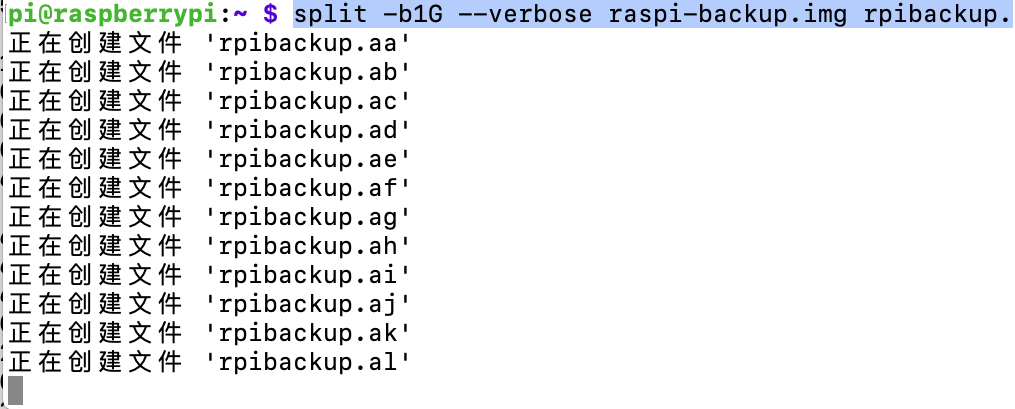
# split -b1000M raspi-backup.img
split -b1G --verbose raspi-backup.img rpibackup.

远程侧执行如下指令
rsync "[email protected]:/home/pi/rpibackup.??" /Volumes/BACKUPDISK/mixdiy.com/backup
传输完成后执行合并指令
cat rpibackup.?? > raspi-backup.img
如遇权限问题可执行以下命令
sudo sh -c 'rpibackup.?? > raspi-backup.img'
注意:
如果将系统盘格式化为exfat32再烧入镜像,则系统无法启动
树莓派系统备份为img的最好方法
http://blog.dngz.net/813.htm
首先,不要用Win32DiskImager备份,不然备份出来文件超大。
用下面这个脚本备份文件才比实际使用空间大一点点。
将如下脚本保存为/tmp/back2img.sh
#!/bin/bash
if [ `whoami` != "root" ];then
echo "This script must be run as root!"
exit 1
fi
# install software
#apt update
apt install -y dosfstools parted kpartx rsync
echo ""
echo "software is ready"
file="rpi-`date +%Y%m%d%H%M%S`.img"
if [ "x$1" != "x" ];then
file="$1"
fi
# boot mount point
boot_mnt=`findmnt -n /dev/mmcblk0p1 | awk '{print $1}'`
root_info=`df -PT / | tail -n 1`
root_type=`echo $root_info | awk '{print $2}'`
dr=`echo $root_info | awk '{print $4}'`
db=`df -P | grep /dev/mmcblk0p1 | awk '{print $2}'`
ds=`echo $dr $db |awk '{print int(($1+$2)*1.2)}'`
echo "create $file ..."
dd if=/dev/zero of=$file bs=1K count=0 seek=$ds
#truncate -s ${ds}k $file
start=`fdisk -l /dev/mmcblk0| awk 'NR==9 {print $2}'`
end=`fdisk -l /dev/mmcblk0| awk 'NR==9 {print $3}'`
if [ "$start" == "*" ];then
start=`fdisk -l /dev/mmcblk0| awk 'NR==9 {print $3}'`
end=`fdisk -l /dev/mmcblk0| awk 'NR==9 {print $4}'`
fi
start=`echo $start's'`
end=`echo $end's'`
end2=`fdisk -l /dev/mmcblk0| awk 'NR==10 {print $2}'`
end2=`echo $end2's'`
echo "start=$start"
echo "end=$end"
echo "end2=$end2"
parted $file --script -- mklabel msdos
parted $file --script -- mkpart primary fat32 $start $end
parted $file --script -- mkpart primary ext4 $end2 -1
loopdevice=`losetup -f --show $file`
device=`kpartx -va $loopdevice | sed -E 's/.*(loop[0-9])p.*/\1/g' | head -1`
device="/dev/mapper/${device}"
echo "device=$device"
partBoot="${device}p1"
partRoot="${device}p2"
echo "partBoot=$partBoot"
echo "partRoot=$partRoot"
sleep 5s
opartuuidb=`blkid -o export /dev/mmcblk0p1 | grep PARTUUID`
opartuuidr=`blkid -o export /dev/mmcblk0p2 | grep PARTUUID`
npartuuidb=`blkid -o export ${partBoot} | grep PARTUUID`
npartuuidr=`blkid -o export ${partRoot} | grep PARTUUID`
boot_label=`dosfslabel /dev/mmcblk0p1 | tail -n 1`
root_label=`e2label /dev/mmcblk0p2 | tail -n 1`
mkfs.vfat -F 32 -n "$boot_label" $partBoot
echo "$partBoot format success"
mkfs.ext4 $partRoot
e2label $partRoot $root_label
echo "$partRoot format success"
mount -t vfat $partBoot /mnt
cp -rfp ${boot_mnt}/* /mnt/
sed -i "s/$opartuuidr/$npartuuidr/g" /mnt/cmdline.txt
sync
umount /mnt
mount -t ext4 $partRoot /mnt
if [ -f /etc/dphys-swapfile ]; then
SWAPFILE=`cat /etc/dphys-swapfile | grep ^CONF_SWAPFILE | cut -f 2 -d=`
if [ "$SWAPFILE" = "" ]; then
SWAPFILE=/var/swap
fi
EXCLUDE_SWAPFILE="--exclude $SWAPFILE"
fi
cd /mnt
rsync --force -rltWDEgop --delete --stats --progress \
$EXCLUDE_SWAPFILE \
--exclude ".gvfs" \
--exclude "$boot_mnt" \
--exclude "/dev" \
--exclude "/media" \
--exclude "/mnt" \
--exclude "/proc" \
--exclude "/run" \
--exclude "/snap" \
--exclude "/sys" \
--exclude "/tmp" \
--exclude "lost\+found" \
--exclude "$file" \
/ ./
if [ ! -d $boot_mnt ]; then
mkdir $boot_mnt
fi
if [ -d /snap ]; then
mkdir /mnt/snap
fi
for i in boot dev media mnt proc run sys boot; do
if [ ! -d /mnt/$i ]; then
mkdir /mnt/$i
fi
done
if [ ! -d /mnt/tmp ]; then
mkdir /mnt/tmp
chmod a+w /mnt/tmp
fi
cd
sed -i "s/$opartuuidb/$npartuuidb/g" /mnt/etc/fstab
sed -i "s/$opartuuidr/$npartuuidr/g" /mnt/etc/fstab
sync
umount /mnt
kpartx -d $loopdevice
losetup -d $loopdevice
用法,直接运行:
cd /tmp/
sudo ./back2img.sh blog.dngz.net.img
注意:如果TF卡剩余空间不够的话就挂载外部硬盘或U盘,将备份的img直接保存在外部磁盘中,并且外部磁盘请挂载到 /media 目录下,不要挂载到 /mnt!
因为脚本会对/mnt目录进行备份操作,会导致不断循环的递归备份,导致磁盘爆满。
总之记住一定不要挂载到/mnt目录!
运行时的备份日志:
Reading package lists... Done
Building dependency tree
Reading state information... Done
dosfstools is already the newest version (4.1-2).
parted is already the newest version (3.2-25).
rsync is already the newest version (3.1.3-6).
The following NEW packages will be installed:
kpartx
0 upgraded, 1 newly installed, 0 to remove and 12 not upgraded.
Need to get 37.8 kB of archives.
After this operation, 86.0 kB of additional disk space will be used.
Get:1 https://mirrors.tuna.tsinghua.edu.cn/debian buster/main arm64 kpartx arm64 0.7.9-3+deb10u1 [37.8 kB]
Fetched 37.8 kB in 1s (47.2 kB/s)
Selecting previously unselected package kpartx.
(Reading database ... 49050 files and directories currently installed.)
Preparing to unpack .../kpartx_0.7.9-3+deb10u1_arm64.deb ...
Unpacking kpartx (0.7.9-3+deb10u1) ...
Setting up kpartx (0.7.9-3+deb10u1) ...
Processing triggers for man-db (2.8.5-2) ...
software is ready
create blog.dngz.net.img ...
0+0 records in
0+0 records out
0 bytes copied, 0.00126612 s, 0.0 kB/s
start=8192s
end=532479s
end2=532480s
device=/dev/mapper/loop0
partBoot=/dev/mapper/loop0p1
partRoot=/dev/mapper/loop0p2
mkfs.fat 4.1 (2017-01-24)
mkfs.fat: warning - lowercase labels might not work properly with DOS or Windows
/dev/mapper/loop0p1 format success
mke2fs 1.44.5 (15-Dec-2018)
Discarding device blocks: done
Creating filesystem with 739328 4k blocks and 185104 inodes
Filesystem UUID: ed9bf852-cd2f-4c1b-a9f6-d1e00bd20844
Superblock backups stored on blocks:
32768, 98304, 163840, 229376, 294912
Allocating group tables: done
Writing inode tables: done
Creating journal (16384 blocks): done
Writing superblocks and filesystem accounting information: done
/dev/mapper/loop0p2 format success
sending incremental file list
rsync同步数据日志省略...
Number of files: 62,378 (reg: 48,951, dir: 5,618, link: 7,809)
Number of created files: 62,376 (reg: 48,951, dir: 5,616, link: 7,809)
Number of deleted files: 0
Number of regular files transferred: 48,951
Total file size: 2,260,121,595 bytes
Total transferred file size: 2,259,998,604 bytes
Literal data: 2,259,998,604 bytes
Matched data: 0 bytes
File list size: 1,703,776
File list generation time: 0.008 seconds
File list transfer time: 0.000 seconds
Total bytes sent: 2,264,157,862
Total bytes received: 990,956
sent 2,264,157,862 bytes received 990,956 bytes 6,214,400.05 bytes/sec
total size is 2,260,121,595 speedup is 1.00
备份后blog.dngz.net.img 显示3.1G(实际占用2.4G),用7z极限压缩后仅为630M。
安装 PiShrink
要在 Linux 机器上安装 PiShrink,请先使用以下命令下载最新版本:
$ wget https://raw.githubusercontent.com/Drewsif/PiShrink/master/pishrink.sh
接下来,将下载的 PiShrink 变成二进制可执行文件:
$ chmod +x pishrink.sh
最后,移动到目录:
$ sudo mv pishrink.sh /usr/local/bin/
使树莓派镜像更小
你可能已经知道,Raspbian 是所有树莓派型号的官方操作系统。树莓派基金会为 PC 和 Mac 开发了树莓派桌面版本。你可以创建一个 live CD,并在虚拟机中运行它,甚至也可以将其安装在桌面上。树莓派也有少量非官方操作系统镜像。为了测试,我从官方下载页面下载了官方的 Raspbian 系统。
解压下载的系统镜像:
$ unzip 2019-04-08-raspbian-stretch-lite.zip
上面的命令将提取当前目录中 2019-04-08-raspbian-stretch-lite.zip 文件的内容。
让我们看下提取文件的实际大小:
$ du -h 2019-04-08-raspbian-stretch-lite.img
1.7G 2019-04-08-raspbian-stretch-lite.img
如你所见,提取的树莓派系统镜像大小为 1.7G。
现在,使用 PiShrink 缩小此文件的大小,如下所示:
$ sudo pishrink.sh 2019-04-08-raspbian-stretch-lite.img
示例输出:
Creating new /etc/rc.local
rootfs: 39795/107072 files (0.1% non-contiguous), 239386/428032 blocks
resize2fs 1.45.0 (6-Mar-2019)
Resizing the filesystem on /dev/loop1 to 280763 (4k) blocks.
Begin pass 3 (max = 14)
Scanning inode table XXXXXXXXXXXXXXXXXXXXXXXXXXXXXXXXXXXXXXXX
Begin pass 4 (max = 3728)
Updating inode references XXXXXXXXXXXXXXXXXXXXXXXXXXXXXXXXXXXXXXXX
The filesystem on /dev/loop1 is now 280763 (4k) blocks long.
Shrunk 2019-04-08-raspbian-stretch-lite.img from 1.7G to 1.2G
正如你在上面的输出中看到的,树莓派镜像的大小已减少到 1.2G。
你还可以使用 -s 标志跳过该过程的自动扩展部分。
$ sudo pishrink.sh -s 2019-04-08-raspbian-stretch-lite.img newpi.img
这将创建一个源镜像文件(即 2019-04-08-raspbian-stretch-lite.img)的副本到一个新镜像文件(newpi.img)并进行处理。有关更多详细信息,请查看最后给出的官方 GitHub 页面。
树莓派安装人脸训练模型 face-recognition
pip install cmake
pip install face-recognition
无法访问raw.githubusercontent.com的解决
我们难免不会访问raw.githubusercontent.com,但因种种因素,国内很难访问这个站点,以下方法可能帮助到你:
https://ip.cn/ip/raw.githubusercontent.com.html
查找到ip为185.199.108.133
sudo nano /etc/hosts
添加
185.199.110.133 raw.githubusercontent.com
注:
如果是windows系统,则修改
C:\Windows\System32\drivers\etc
hosts文件
精彩的树梅派项目
https://www.tomshardware.com/features/best-raspberry-pi-projects
树莓派人脸识别
https://www.tomshardware.com/how-to/raspberry-pi-facial-recognition
树莓派系统及软件备份
https://www.tomshardware.com/how-to/back-up-raspberry-pi-as-disk-image
如何设置 Raspberry Pi Web 服务器
https://www.tomshardware.com/news/raspberry-pi-web-server,40174.html
python图像边缘检测并生成svg图像
https://zhuanlan.zhihu.com/p/398237689
from typing import Iterable, List, Tuple, Union
import cv2
import matplotlib.pyplot as plt
import numpy as np
from xml.dom import minidom as md
from queue import Queue
import warnings
def look_shape(a : Iterable) -> Tuple:
# for debug
return np.array(a).shape
def length_within_points(a : Iterable, empty_value : Union[int, float] = 0) -> int:
"""
a simple instance:
array : [empty_value, empty_value, empty_value, 1, empty_value, 0, 1, 2, empty_value]
Then length_within_points(array) will return index diff between 1 and 2, which is 5
"""
a = list(a)
l_pivot, r_pivot = -1, -2
for index, (l_val, r_val) in enumerate(zip(a[::1], a[::-1])):
if l_val != empty_value and l_pivot == -1:
l_pivot = index
if r_val != empty_value and r_pivot == -2:
r_pivot = len(a) - index
return r_pivot - l_pivot + 1
def dump_rings_from_image(image : np.ndarray, output_path : str, plot_dict : dict = {"color" : "k", "linewidth" : 0.3}, default_height : float = 8) -> List[np.ndarray]:
# regular operation, no more explainations
blur = cv2.GaussianBlur(image, (3, 3), 0)
gray = cv2.cvtColor(blur, cv2.COLOR_BGR2GRAY)
edge = cv2.Canny(gray, 50, 150)
# get ratio between width and height to adjust the final output
valid_width = length_within_points(edge.sum(axis=0))
valid_height = length_within_points(edge.sum(axis=1))
true_ratio = valid_width / valid_height
# get contour of the edge image
contour_tuple = cv2.findContours(edge, mode=cv2.RETR_TREE, method=cv2.CHAIN_APPROX_NONE)
contours = contour_tuple[0]
rings = [np.array(c).reshape([-1, 2]) for c in contours]
# adjust coordinate system to the image coordinate system
max_x, max_y, min_x, min_y = 0, 0, 0, 0
for ring in rings:
max_x = max(max_x, ring.max(axis=0)[0])
max_y = max(max_y, ring.max(axis=0)[1])
min_x = max(min_x, ring.min(axis=0)[0])
min_y = max(min_y, ring.min(axis=0)[1])
# adjust ratio
plt.figure(figsize=[default_height * true_ratio, default_height])
# plot to the matplotlib
for _, ring in enumerate(rings):
close_ring = np.vstack((ring, ring[0]))
xx = close_ring[..., 0]
yy = max_y - close_ring[..., 1]
plt.plot(xx, yy, **plot_dict)
plt.axis("off")
plt.savefig(output_path)
def remove_matplotlib_background(svg_file : str, bg_node_name : str = "patch_1") -> None:
dom_tree : md.Document = md.parse(svg_file)
svg_node = None
# select the svg tag
for node in dom_tree.childNodes:
if node.nodeName == "svg":
svg_node : md.Element = node
if svg_node is None:
raise ValueError("not find a svg node in {}".format(svg_file))
# bfs svg node to find the background node
q = Queue()
q.put(svg_node)
target_node = None # we will remove the target node
while not q.empty():
cur : md.Node = q.get()
if cur.hasChildNodes():
for node in cur.childNodes:
q.put(node)
if hasattr(cur, "getAttribute"):
# this is the id of the background node
if cur.getAttribute("id") == bg_node_name:
target_node = cur
if target_node is None:
warnings.warn("background node is not found, please ensure whether bg_node_name is correct")
else: # remove and write
target_node.parentNode.removeChild(target_node)
with open(svg_file, "w", encoding="utf-8") as fp:
dom_tree.writexml(
writer=fp,
indent="\t"
)
def bitmap_to_contour_svg(input_bitmap_path : str, output_svg_path : str):
img = cv2.imread(input_bitmap_path)
dump_rings_from_image(img, output_path=output_svg_path)
remove_matplotlib_background(output_svg_path)
if __name__ == '__main__':
bitmap_to_contour_svg(
input_bitmap_path="555.png",
output_svg_path="abc.svg"
)
一个简单方式
from PIL import Image, ImageFilter
img = Image.open('abc.jpg') # 打开图片文件
newimg = img.filter(ImageFilter.CONTOUR) # 设置图片轮廓筛选器
newimg.save('轮廓效果.png', 'png') # 保存轮廓效果的图片
数据清洗、筛选、去重、排序、提取
Mexicans were there enveloped5 in their sarapes; Chinamen in their large-sleeved tunics6, pointed7 shoes, and conical hats; one or two Kanucks from the coast; and even a sprinkling of Black Feet, Grosventres, or Flatheads, from the banks of the Trinity river.
The scene is in San Francisco, the capital of California, but not at the period when the placer-mining fever was raging—from 1849 to 1852. San Francisco was no longer what it had been then, a caravanserai, a terminus, an inn, where for a night there slept the busy men who were hastening to the gold-fields west of the Sierra Nevada. At the end of some twenty years the old unknown Yerba-Buena had given place to a town unique of its kind, peopled by 100,000 inhabitants, built under the shelter of a couple of hills, away from the shore, but stretching off to the farthest heights in the background—a city in short which has dethroned Lima, Santiago, Valparaiso, and every other rival, and which the Americans have made the queen of the Pacific, the "glory of the western coast!"
It was the 15th of May, and the weather was still cold. In California, subject as it is to the direct action of the polar currents, the first weeks of this month are somewhat similar to the last weeks of March in Central Europe. But the cold was hardly noticeable in the thick of the auction crowd. The bell with its incessant8 clangour had[Pg 3] brought together an enormous throng9, and quite a summer temperature caused the drops of perspiration10 to glisten11 on the foreheads of the spectators which the cold outside would have soon solidified12.
Do not imagine that all these folks had come to the auction-room with the intention of buying. I might say that all of them had but come to see. Who was going to be mad enough, even if he were rich enough, to purchase an isle13 of the Pacific, which the government had in some eccentric moment decided14 to sell? Would the reserve price ever be reached? Could anybody be found to work up the bidding? If not, it would scarcely be the fault of the public crier, who tried his best to tempt15 buyers by his shoutings and gestures, and the flowery metaphors16 of his harangue17. People laughed at him, but they did not seem much influenced by him.
"An island! an isle to sell!" repeated Gingrass.
"But not to buy!" answered an Irishman, whose pocket did not hold enough to pay for a single pebble18.
"An island which at the valuation will not fetch six dollars an acre!" said the auctioneer.
"And which won't pay an eighth per cent.!" replied a big farmer, who was well acquainted with agricultural speculations19.
"An isle which measures quite sixty-four miles round[Pg 4] and has an area of two hundred and twenty-five thousand acres!"
"Is it solid on its foundation?" asked a Mexican, an old customer at the liquor-bars, whose personal solidity seemed rather doubtful at the moment.
"An isle with forests still virgin20!" repeated the crier, "with prairies, hills, watercourses—"
"Warranted?" asked a Frenchman, who seemed rather inclined to nibble21.
"Yes! warranted!" added Felporg, much too old at his trade to be moved by the chaff22 of the public.
"For two years?"
"To the end of the world!"
"Beyond that?"
"A freehold island!" repeated the crier, "an island without a single noxious23 animal, no wild beasts, no reptiles24!—"
"No birds?" added a wag.
"No insects?" inquired another.
"An island for the highest bidder!" said Dean Felporg, beginning again. "Come, gentlemen, come! Have a little courage in your pockets! Who wants an island in perfect state of repair, never been used, an island in the Pacific, that ocean of oceans? The valuation is a mere25 nothing! It is put at eleven hundred thousand dollars, is there any[Pg 5] one will bid? Who speaks first? You, sir?—you, over there nodding your head like a porcelain26 mandarin27? Here is an island! a really good island! Who says an island?"
"Pass it round!" said a voice as if they were dealing28 with a picture or a vase.
And the room shouted with laughter, but not a half-dollar was bid.
However, if the lot could not be passed round, the map of the island was at the public disposal. The whereabouts of the portion of the globe under consideration could be accurately29 ascertained30. There was neither surprise nor disappointment to be feared in that respect. Situation, orientation31, outline, altitudes, levels, hydrography, climatology, lines of communication, all these were easily to be verified in advance. People were not buying a pig in a poke32, and most undoubtedly33 there could be no mistake as to the nature of the goods on sale. Moreover, the innumerable journals of the United States, especially those of California, with their dailies, bi-weeklies, weeklies, bi-monthlies, monthlies, their reviews, magazines, bulletins, &c., had been for several months directing constant attention to the island whose sale by auction had been authorized34 by Act of Congress.
The island was Spencer Island, which lies in the [Pg 6]west-south-west of the Bay of San Francisco, about 460 miles from the Californian coast, in 32° 15' north latitude35, and 145° 18' west longitude36, reckoning from Greenwich. It would be impossible to imagine a more isolated37 position, quite out of the way of all maritime38 or commercial traffic, although Spencer Island was relatively39, not very far off, and situated40 practically in American waters. But thereabouts the regular currents diverging41 to the north and south have formed a kind of lake of calms, which is sometimes known as the "Whirlpool of Fleurieu."
It is in the centre of this enormous eddy42, which has hardly an appreciable43 movement, that Spencer Island is situated. And so it is sighted by very few ships. The main routes of the Pacific, which join the new to the old continent, and lead away to China or Japan, run in a more southerly direction. Sailing-vessels would meet with endless calms in the Whirlpool of Fleurieu; and steamers, which always take the shortest road, would gain no advantage by crossing it. Hence ships of neither class know anything of Spencer Island, which rises above the waters like the isolated summit of one of the submarine mountains of the Pacific. Truly, for a man wishing to flee from the noise of the world, seeking quiet in solitude44, what could be better than this island, lost within a few hundred miles of the coast? For a voluntary Robinson Crusoe, it would[Pg 7] be the very ideal of its kind! Only of course he must pay for it.
And now, why did the United States desire to part with the island? Was it for some whim45? No! A great nation cannot act on caprice in any matter, however simple. The truth was this: situated as it was, Spencer Island had for a long time been known as a station perfectly46 useless. There could be no practical result from settling there. In a military point of view it was of no importance, for it only commanded an absolutely deserted47 portion of the Pacific. In a commercial point of view there was a similar want of importance, for the products would not pay the freight either inwards or outwards48. For a criminal colony it was too far from the coast. And to occupy it in any way, would be a very expensive undertaking49. So it had remained deserted from time immemorial, and Congress, composed of "eminently50 practical" men, had resolved to put it up for sale—on one condition only, and that was, that its purchaser should be a free American citizen. There was no intention of giving away the island for nothing, and so the reserve price had been fixed51 at $1,100,000. This amount for a financial society dealing with such matters was a mere bagatelle52, if the transaction could offer any advantages; but as we need hardly repeat, it offered none, and competent men[Pg 8] attached no more value to this detached portion of the United States, than to one of the islands lost beneath the glaciers53 of the Pole.
In one sense, however, the amount was considerable. A man must be rich to pay for this hobby, for in any case it would not return him a halfpenny per cent. He would even have to be immensely rich for the transaction was to be a "cash" one, and even in the United States it is as yet rare to find citizens with $1,100,000 in their pockets, who would care to throw them into the water without hope of return.
And Congress had decided not to sell the island under the price. Eleven hundred thousand dollars, not a cent less, or Spencer Island would remain the property of the union.
It was hardly likely that any one would be mad enough to buy it on the terms.
Besides, it was expressly reserved that the proprietor54, if one offered, should not become king of Spencer Island, but president of a republic. He would gain no right to have subjects, but only fellow-citizens, who could elect him for a fixed time, and would be free from re-electing him indefinitely. Under any circumstances he was forbidden to play at monarchy55. The union could never tolerate the foundation of a kingdom, no matter how small, in American waters.
[Pg 9]
This reservation was enough to keep off many an ambitious millionaire, many an aged56 nabob, who might like to compete with the kings of the Sandwich, the Marquesas, and the other archipelagoes of the Pacific.
In short, for one reason or other, nobody presented himself. Time was getting on, the crier was out of breath in his efforts to secure a buyer, the auctioneer orated without obtaining a single specimen57 of those nods which his estimable fraternity are so quick to discover; and the reserve price was not even mentioned.
However, if the hammer was not wearied with oscillating above the rostrum, the crowd was not wearied with waiting around it. The joking continued to increase, and the chaff never ceased for a moment. One individual offered two dollars for the island, costs included. Another said that a man ought to be paid that for taking it.
And all the time the crier was heard with,—
"An island to sell! an island for sale!"
数据清洗、筛选、去重、排序、提取
import re
#a='Beautiful, is; better*than\nugly'
a='Mexicans were there enveloped5 in their sarapes; Chinamen in their large-sleeved tunics6, pointed7 shoes, and conical hats; one or two Kanucks from the coast; and even a sprinkling of Black Feet, Grosventres, or Flatheads, from the banks of the Trinity river.The scene is in San Francisco, the capital of California, but not at the period when the placer-mining fever was raging—from 1849 to 1852. San Francisco was no longer what it had been then, a caravanserai, a terminus, an inn, where for a night there slept the busy men who were hastening to the gold-fields west of the Sierra Nevada. At the end of some twenty years the old unknown Yerba-Buena had given place to a town unique of its kind, peopled by 100,000 inhabitants, built under the shelter of a couple of hills, away from the shore, but stretching off to the farthest heights in the background—a city in short which has dethroned Lima, Santiago, Valparaiso, and every other rival, and which the Americans have made the queen of the Pacific, the "glory of the western coast!"It was the 15th of May, and the weather was still cold. In California, subject as it is to the direct action of the polar currents, the first weeks of this month are somewhat similar to the last weeks of March in Central Europe. But the cold was hardly noticeable in the thick of the auction crowd. The bell with its incessant8 clangour had[Pg 3] brought together an enormous throng9, and quite a summer temperature caused the drops of perspiration10 to glisten11 on the foreheads of the spectators which the cold outside would have soon solidified12.Do not imagine '
# 四个分隔符为:, ; * \n
x= re.split(' |,|; |\*|\n',a)
for t in x:
print(t)
去重、排序
import re
#a='Beautiful, is; better*than\nugly'
a='Mexicans were there enveloped5 in their sarapes; Chinamen in their large-sleeved tunics6, pointed7 shoes, and conical hats; one or two Kanucks from the coast; and even a sprinkling of Black Feet, Grosventres, or Flatheads, from the banks of the Trinity river.The scene is in San Francisco, the capital of California, but not at the period when the placer-mining fever was raging—from 1849 to 1852. San Francisco was no longer what it had been then, a caravanserai, a terminus, an inn, where for a night there slept the busy men who were hastening to the gold-fields west of the Sierra Nevada. At the end of some twenty years the old unknown Yerba-Buena had given place to a town unique of its kind, peopled by 100,000 inhabitants, built under the shelter of a couple of hills, away from the shore, but stretching off to the farthest heights in the background—a city in short which has dethroned Lima, Santiago, Valparaiso, and every other rival, and which the Americans have made the queen of the Pacific, the "glory of the western coast!"It was the 15th of May, and the weather was still cold. In California, subject as it is to the direct action of the polar currents, the first weeks of this month are somewhat similar to the last weeks of March in Central Europe. But the cold was hardly noticeable in the thick of the auction crowd. The bell with its incessant8 clangour had[Pg 3] brought together an enormous throng9, and quite a summer temperature caused the drops of perspiration10 to glisten11 on the foreheads of the spectators which the cold outside would have soon solidified12.Do not imagine '
# 四个分隔符为:, ; * \n
x= re.split(' |,|; |\*|\n',a)
lista=list(set(x))
lista.sort(key=len)
for t in sorted(lista,key = len):
print(t)
朋途-putug
http域名:uza3jlgx.hk.wknwct.top:80(绑定内网80端口,用于建站)
面板域名:uza3jlgxmb.hk.wknwct.top:80(绑定内网8888端口,用于访问面板)
Https域名:uza3jlgxs.hk.wknwct.top:443(需要开启并部署证书,未开启默认http端口)
Phpmyadmin:uza3jlgxsql.hk.wknwct.top:80/phpmyadmin_ba74697dda5af6e2 (绑定内网888端口,用于数据库管理)
SSH端口:8613(默认绑定内网22端口,用于远程链接服务器,地址为赠送或绑定的域名)
数据库端口:38613(默认绑定内网3306端口,用于远程数据库链接,地址为赠送或绑定的域名)
提示信息:请绑定自己的域名。香港线路,三网双程直连 国内访问速度飞快, 无防机房,被攻击封一小时IP
再Centos7上安装python3
第一步:安装相关依赖包和编译环境
$>yum -y install zlib-devel bzip2-devel openssl-devel ncurses-devel sqlite-devel readline-devel tk-devel gdbm-devel db4-devel libpcap-devel xz-devel gcc
(注意:这一步很重要,如果不安装相关依赖包,在使用pip安装python包时会报找不到SSL错误!)
第二步:下载python3.8.0安装包
$>wget https://www.python.org/ftp/python/3.8.0/Python-3.8.0.tar.xz
第三步:解压安装包并创建安装目录
$>xz -d Python-3.8.0.tar.xz
$>tar -xvf Python-3.8.0.tar
$>mkdir /usr/local/python3.8.0
第四步:编译安装
$>cd Python-3.8.0
$>./configure –with-ssl –prefix=/usr/local/python3.8.0
(注意:prefix后面配置第三步中创建的路径,且等号两边不能有空格,不然会报错)
$>make && make install
第五步:创建python3.6.5软链接
$>ln -s /usr/local/python3.8.0/bin/python3.8 /usr/bin/python3
$>ln -s /usr/local/python3.8.0/bin/pip3.8 /usr/bin/pip3
$>pip3 install –upgrade pip(升级pip3)
第六步:修改python2.7.5软链接(这一步可有可无)
$>mv /usr/bin/python /usr/bin/python2
第七步:验证,使用python3进入python3.8.0命令行
$>python3
Centos7系统编译安装PHP7.4
最近买了个盒子,拆开一看是用了一家已经倒闭的某公司的产品,拆了板子重新烧录了Centos7系统装了宝塔再加了个新壳子,首先应该肯定的是卖家会做生意,不敢苟同的是里面一堆坑要踩,当然想买这种板子的人都是爱折腾的,估计卖家也是吃准了这一点。我一个centos新手(拿到这个盒子之前从来没摸过centos)被折腾的够呛,本来买盒子就一个目的,架一个个人博客(当然选wordpress),结果盒子自带的php版本太低,wordpress直接警告,随后按卖家文档升级,于是坑一个接一个。。。。。说说多了,最后总结,这玩意只能编译安装,步骤如下:
安装依赖包
yum install libxml2 libxml2-devel openssl openssl-devel bzip2 bzip2-devel libcurl libcurl-devel libjpeg libjpeg-devel libpng libpng-devel freetype freetype-devel gmp gmp-devel libmcrypt libmcrypt-devel readline readline-devel libxslt libxslt-devel zlib zlib-devel glibc glibc-devel glib2 glib2-devel ncurses curl gdbm-devel db4-devel libXpm-devel libX11-devel gd-devel gmp-devel expat-devel xmlrpc-c xmlrpc-c-devel libicu-devel libmcrypt-devel libmemcached-devel
下载安装包
wget https://www.php.net/distributions/php-7.4.10.tar.gz
解压
tar -xf php-7.4.10.tar.gz
进入目录
cd php-7.4.10
安装配置
./configure \
--prefix=/usr/local/php7.1.33 \
--enable-fpm \
--enable-inline-optimization \
--disable-debug \
--disable-rpath \
--enable-shared \
--enable-soap \
--with-libxml-dir \
--with-xmlrpc \
--with-openssl \
--with-mcrypt \
--with-mhash \
--with-pcre-regex \
--with-sqlite3 \
--with-zlib \
--enable-bcmath \
--with-iconv \
--with-bz2 \
--enable-calendar \
--with-curl \
--with-cdb \
--enable-dom \
--enable-exif \
--enable-fileinfo \
--enable-filter \
--with-pcre-dir \
--enable-ftp \
--with-gd \
--with-openssl-dir \
--with-jpeg-dir \
--with-png-dir \
--with-zlib-dir \
--with-freetype-dir \
--enable-gd-native-ttf \
--enable-gd-jis-conv \
--with-gettext \
--with-gmp \
--with-mhash \
--enable-json \
--enable-mbstring \
--enable-mbregex \
--enable-mbregex-backtrack \
--with-libmbfl \
--with-onig \
--enable-pdo \
--with-mysqli=mysqlnd \
--with-pdo-mysql=mysqlnd \
--with-zlib-dir \
--with-pdo-sqlite \
--with-readline \
--enable-session \
--enable-shmop \
--enable-simplexml \
--enable-sockets \
--enable-sysvmsg \
--enable-sysvsem \
--enable-sysvshm \
--enable-wddx \
--with-libxml-dir \
--with-xsl \
--enable-zip \
--enable-mysqlnd-compression-support \
--with-pear \
--enable-opcache
编译安装
make && make install
Centos8 编译安装 PHP 8.1.0 – 简书 (jianshu.com)
如果是源码安装,先运行./configure,生成makefile,再执行make,即可正常运行
Centos8 编译安装 PHP 8.1.0
安装工具包
yum -y install libtool automake libzip-devel epel-release libxml2 libxml2-devel openssl openssl-devel curl-devel libjpeg-devel libpng-devel freetype-devel libmcrypt-devel uuid libuuid-devel gcc bzip2 bzip2-devel gmp-devel readline-devel libxslt-devel autoconf bison gcc gcc-c++ sqlite-devel cmake
下载安装 oniguruma
wget -c https://github.com/kkos/oniguruma/archive/refs/tags/v6.9.7.1.tar.gz
tar -zxvf v6.9.7.1.tar.gz
cd oniguruma-6.9.7.1
./autogen.sh && ./configure --prefix=/usr
make && make install
下载安装 php 8.1.0
wget -c https://www.php.net/distributions/php-8.1.0.tar.gz
tar -zxvf php-8.1.0.tar.gz
cd php-8.1.0
./configure \
--prefix=/opt/php/8.1.0 \
--with-config-file-path=/opt/php/8.1.0/etc \
--with-config-file-scan-dir=/opt/php/8.1.0/etc/conf.d \
--enable-fpm \
--enable-soap \
--with-openssl \
--with-openssl-dir \
--with-zlib \
--with-iconv \
--with-bz2 \
--enable-gd \
--with-jpeg \
--with-freetype \
--with-curl \
--enable-dom \
--with-xml \
--with-zip \
--enable-mbstring \
--enable-pdo \
--with-pdo-mysql \
--with-zlib-dir \
--enable-session \
--enable-shmop \
--enable-simplexml \
--enable-sockets \
--enable-sysvmsg \
--enable-sysvsem \
--enable-sysvshm \
--with-xsl \
--enable-mysqlnd \
--with-mysqli \
--without-pear \
--disable-short-tags
make && make install
Installing shared extensions: /opt/php/8.1.0/lib/php/extensions/no-debug-non-zts-20210902/
Installing PHP CLI binary: /opt/php/8.1.0/bin/
Installing PHP CLI man page: /opt/php/8.1.0/php/man/man1/
Installing PHP FPM binary: /opt/php/8.1.0/sbin/
Installing PHP FPM defconfig: /opt/php/8.1.0/etc/
Installing PHP FPM man page: /opt/php/8.1.0/php/man/man8/
Installing PHP FPM status page: /opt/php/8.1.0/php/php/fpm/
Installing phpdbg binary: /opt/php/8.1.0/bin/
Installing phpdbg man page: /opt/php/8.1.0/php/man/man1/
Installing PHP CGI binary: /opt/php/8.1.0/bin/
Installing PHP CGI man page: /opt/php/8.1.0/php/man/man1/
Installing build environment: /opt/php/8.1.0/lib/php/build/
Installing header files: /opt/php/8.1.0/include/php/
Installing helper programs: /opt/php/8.1.0/bin/
program: phpize
program: php-config
Installing man pages: /opt/php/8.1.0/php/man/man1/
page: phpize.1
page: php-config.1
/home/centos/php-8.1.0/build/shtool install -c ext/phar/phar.phar /opt/php/8.1.0/bin/phar.phar
ln -s -f phar.phar /opt/php/8.1.0/bin/phar
Installing PDO headers: /opt/php/8.1.0/include/php/ext/pdo/
启动和后续配件可以参考这里
Centos7 编译 PHP7.4.16 – 简书 (jianshu.com)
增加扩展
进入刚才的解压目录
#安装GD库示例
cd php-8.1.0/ext/gd
/opt/php/8.1.0/bin/phpize
Configuring for:
PHP Api Version: 20210902
Zend Module Api No: 20210902
Zend Extension Api No: 420210902
./configure --with-php-config=/opt/php/8.1.0/bin/php-config
make && make install
完成后记得在 php.ini 里加入
extension=gd.so
PHP8 主要不向后兼容的变更
- 字符串与数字的比较
数字与非数字形式的字符串之间的非严格比较现在将首先将数字转为字符串,然后比较这两个字符串。
数字与数字形式的字符串之间的比较仍然像之前那样进行。
请注意,这意味着 0 == “not-a-number” 现在将被认为是 false 。
| Comparison | Before | After |
|---|---|---|
| 0 == “0” | true | true |
| 0 == “0.0” | true | true |
| 0 == “foo” | true | false |
| 0 == “” | true | false |
| 42 == ” 42″ | true | true |
| 42 == “42foo” | true | false |
match现在是一个保留字。- 断言(Assertion)失败现在默认抛出异常。如果想要改回之前的行为,可以在 INI 设置中设置
assert.exception=0。 - 与类名相同的方法名将不再被当做构造方法。应该使用__construct() 来取代它。
- 不再允许通过静态调用的方式去调用非静态方法。因此is_callable()在检查一个类名与非静态方法 时将返回失败(应当检查一个类的实例)。
(real)和(unset)转换已被移除
PHP8 主要新特性
命名参数
新增命名参数的功能。
注解(Attributes)
新增注解的功能。
构造器属性提升(Constructor Property Promotion)
新增构造器属性提升功能 在构造函数中声明类的属性)。
联合类型
新增 联合类型。
Match 表达式
新增 match 表达式。
Nullsafe 运算符
新增Nullsafe 运算符(?->)。
其他新特性
- 新增 WeakMap 类。
- 新增 ValueError 类。
- 现在,只要类型兼容,任意数量的函数参数都可以用一个可变参数替换。 例如允许编写下面的代码:
<?php class A {
public function method(int $many, string $parameters, $here) {}
}
class B extends A {
public function method(...$everything) {}
} ?>
- static (“后期静态绑定”中) 可以作为返回类型:
<?php class Test {
public function create(): static {
return new static();
}
} ?>
- 现在可以通过
$object::class获取类名,返回的结果和get_class($object)一致。 new、instanceof可用于任何表达式, 用法为new (expression)(...$args)和$obj instanceof (expression)。- 添加对一些变量语法一致性的修复,例如现在能够编写
Foo::BAR::$baz。 - 添加 Stringable interface, 当一个类定义 __toString() 方法后会自动实现该接口。
- Trait 可以定义私有抽象方法(abstract private method)。 类必须实现 trait 定义的该方法。
- 可作为表达式使用
throw。 使得可以编写以下用法:
<?php
$fn = fn() => throw new Exception('Exception in arrow function'); $user = $session->user ?? throw new Exception('Must have user');
- 参数列表中的末尾逗号为可选。
<?php function functionWithLongSignature(
Type1 $parameter1,
Type2 $parameter2, // <-- 这个逗号也被允许了 ) {
}
- 现在允许
catch (Exception)一个 exception 而无需捕获到变量中。 - 支持 mixed 类型。